

ToxicBuilt
New Member
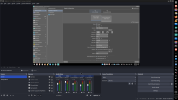
For some reason my Screen Capture (Pipewire) source has become extremely washed out. When attempting to make a new source, it has the same issue.
However, this does not apply to Game Captures. Game Captures appear to work perfectly fine. This seems to only affect Screen Capture (Pipewire).
This also affects the output, so it's not just a preview visual issue.
I am running KDE Plasma 6.7.4, Wayland, and Pipewire on Nobara Linux (which is based on Fedora). OBS comes preinstalled with the distro, so I am unsure what exact package it is, but I do know that it is not Flatpak, Steam, AppImage, or Snap.
Just today I both updated OBS to 32.1.2, and installed a secondary graphics card, being the Intel Arc A380.
I did not have this issue until after starting up my PC after updating OBS and installing the graphics card.
I updated and installed the graphics card at the same time, so I am unsure which of those two reasons, caused it, or if it was even either of those at all.
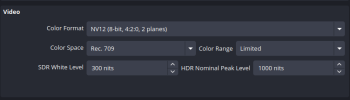
I have tried every color space in the advanced settings to no avail.
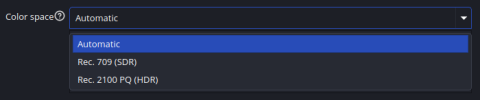
I have also tried changing the color space of the screen capture to no avail. Changing it to Rec. 2100 PQ (HDR) just does the opposite effect by over-saturating and darkening the screen.
I attached 4 images below, it's my first time using the forums, so I hope I attached them properly.
If anyone has ANY ideas, please tell me them. Thank you for reading.
However, this does not apply to Game Captures. Game Captures appear to work perfectly fine. This seems to only affect Screen Capture (Pipewire).
This also affects the output, so it's not just a preview visual issue.
I am running KDE Plasma 6.7.4, Wayland, and Pipewire on Nobara Linux (which is based on Fedora). OBS comes preinstalled with the distro, so I am unsure what exact package it is, but I do know that it is not Flatpak, Steam, AppImage, or Snap.
Just today I both updated OBS to 32.1.2, and installed a secondary graphics card, being the Intel Arc A380.
I did not have this issue until after starting up my PC after updating OBS and installing the graphics card.
I updated and installed the graphics card at the same time, so I am unsure which of those two reasons, caused it, or if it was even either of those at all.
I have tried every color space in the advanced settings to no avail.
I have also tried changing the color space of the screen capture to no avail. Changing it to Rec. 2100 PQ (HDR) just does the opposite effect by over-saturating and darkening the screen.
I attached 4 images below, it's my first time using the forums, so I hope I attached them properly.
If anyone has ANY ideas, please tell me them. Thank you for reading.